


Pachinko Card Reader Emulator System
Compatibility
The Card Reader Emulator system is only compatible with 'Card Reader' enabled pachinko machines, this includes the majority of machines produced in the last five years, but to be certain that your machine is compatible you need to check for the following features...
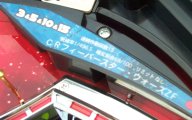
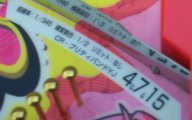
Firstly the Japanese name of the game will be preceeded by the letters 'CR'. The easiest place to check for this is on the label near the top of the playfield. This label also shows you the odds of a win and the prize ball payout for various pockets on the machine.
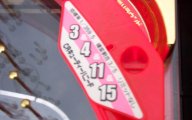
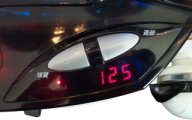
Secondly there will be two 'parlour' buttons near the ball shooter tray on the front of the machine. These buttons are used in the parlour to dispense balls and deduct credit from the prepaid cards. Usually the left most one is the 'Ball Loan' button and the right hand one is the 'Return' button. There will also be a three digit credit display on the machine, though this may not be easily visible as it will not light up without a card reader emulator unit connected (or a genuine parlour prepaid card unit!).
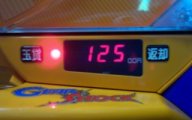
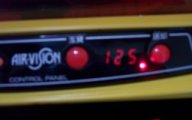
Finally the machine has a D-25 connector on the rear (similar to an old style PC printer port) for the pachinko machine to connect to the card reader unit. For home use this connector will usually have a card reader bypass 'dongle' plugged into it for the machine to operate. If this dongle is removed, the shooter handle will no longer fire balls onto the playfield.
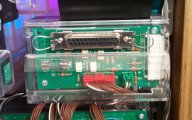
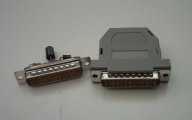

Some vendors modify the machines so that a card reader bypass dongle is not required. But as long as the card reader interface socket is still present on the machine, there should be no problems using the machine with the Card Reader Emulator unit. Though the modification may have to be removed in some cases.
The card unit interface socket is usually located near the lower corner of the machine on the side nearest the hinge.
On some machines the socket is positioned so that there is not enough clearance around the socket for the Card Reader Emulator unit to be fitted to the machine, for these machines a short extension ribbon cable is required to allow the Card Reader Emulator unit to be connected. These extension cables are available as an optional extra when purchasing your Card Reader Emulator unit.
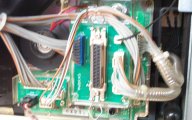

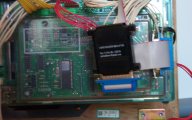
Sanyo Machines.
Machines in certain Sanyo frames (New Sea Story etc) need slightly different signal levels to enable the shooter handle. This results in some machines where the shooter handle will not operate with a Rev 1 Card Reader Emulator unit installed.
The Rev 2 Card Reader Emulator unit has an improved power supply circuit, and will work correctly with all CR Ready pachinko machines (including Sanyo). If you wish to use a Rev 1 Card Reader Emulator with a Sanyo machine you may need to modify the pachinko machine so that the shooter handle is always enabled.
Click Here for details of the required modification to the shooter handle enable circuitry.
Alternatively the Rev 1 Card Reader Emulator unit can be modified to change it's signalling voltage to be compatible with Sanyo machines. Please contact us for details of this voltage level modification.
